How does TeamOrgChart work?
TeamOrgChart connects to your approved Microsoft 365 data sources—such as Entra ID, SharePoint Lists, and Excel—to generate dynamic org charts. Employees can search, browse, and explore your organization’s structure in a secure, permission-controlled environment.
What data does TeamOrgChart store?
TeamOrgChart stores only metadata necessary for displaying charts, such as chart names, display rules, bookmarks, and display settings. None of this metadata includes personal employee information.
We do not store or copy your employee data. Instead, using Microsoft Graph, we read and display data directly from your organization's SharePoint, Office 365, or Entra ID, after receiving your consent.
There are specific exceptions where employee data might be temporarily stored:
-
When using excel-based charts and plans
When users manually upload or enter organizational data (e.g. via spreadsheet uploads or creating a 'Plan'), this data is stored within TeamOrgChart. This does not apply when using SharePoint Online, Office 365, or Entra ID as the data source.
-
When using vacant and temporary positions
Positions created directly within TeamOrgChart (e.g. temporary roles or vacant positions) are stored within the application since we cannot write back to your Office 365, SharePoint, or Entra ID data sources.
-
When remapping employees
If users manually adjust reporting lines by moving employees under different managers, we store only the positional changes not personal data about the employees involved.
How does TeamOrgChart use your data?
We display your org chart and that's all. Sometimes the chart appears in alternative formats, such as an 'Overview' or 'Staff Directory,' but the data is never aggregated or processed beyond what's necessary to deliver the service.
Your data is never shared with third parties. The only exception is Microsoft, as TeamOrgChart relies on Microsoft's Azure platform and services (such as Application Insights) to securely deliver, monitor, and maintain the application.
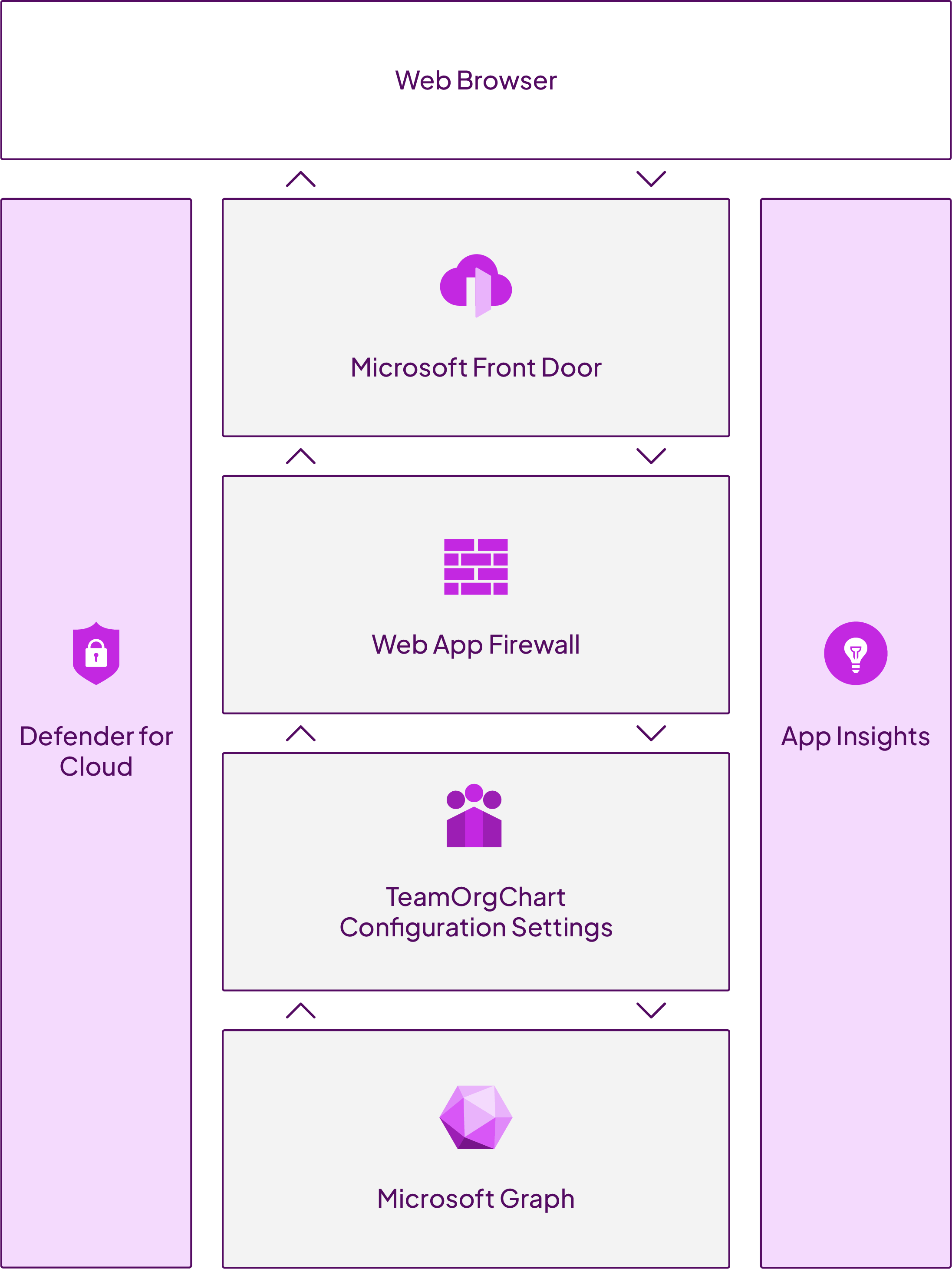
Architecture
TeamOrgChart is built using a secure and scalable Microsoft Azure architecture.
-
Access
Users access the application via their web browsers or Microsoft Teams application via Azure Front Door, which provides global availability and performance.
A global, scalable entry-point that uses the Microsoft global edge network to create fast, secure, and widely scalable overview web applications.
-
Data retrival
Microsoft Graph securely handles data retrieval from your organization's resources.
Microsoft Graph is the gateway to data and intelligence in Microsoft cloud services like Microsoft Entra and Microsoft 365.
-
Security
Security is ensured by Azure's Web Application Firewall and Defender for Cloud.
Protection for the top 10 Open Web Application Security Project (OWASP) security vulnerabilities.
-
Monitoring
Application Insights continuously monitors and optimizes the application's performance and reliability.
Frequently asked questions
TeamOrgChart supports authentication through Microsoft Entra (Azure Active Directory) and utilizes Single Sign-On (SSO). Users authenticate with corporate credentials managed via Microsoft.
No, TeamOrgChart does not store user passwords or manage user accounts internally. Authentication is handled exclusively through Microsoft Entra.
Yes, all data transmitted to and from TeamOrgChart is encrypted using TLS 1.2 or higher, and data stored at rest is encrypted using secure encryption methods provided by Microsoft Azure.
No, TeamOrgChart does not share any customer data with third parties. The only exception is data processed through Microsoft Azure services, used solely to ensure security and performance.
Upon termination, your data is retained for a brief period (typically 30 days) to enable data retrieval or migration, after which it is permanently deleted.
TeamOrgChart uses Microsoft Defender for Cloud and Application Insights for internal security monitoring and alerting. Security incidents trigger alerts to internal teams, and customers can designate security contacts to be notified directly in case of critical incidents.
Administrative privileges are managed through clearly defined roles (Read-only User, Chart Administrator, User Administrator) either directly within TeamOrgChart or via Microsoft Entra. Administrators are recommended to configure multiple administrators to ensure continuous access.
All data is securely stored within Microsoft Azure data centers located in the European Union, complying with regional data protection regulations.
Yes, TeamOrgChart conducts regular vulnerability assessments and penetration tests as part of our security assurance process.
Yes, TeamOrgChart fully complies with GDPR and the Data Protection Act (DPA). Our processes ensure that personal data handling aligns with these regulations.
Downloads |
Last updated | |
|---|---|---|
| Terms of use | View online |
February 2025 |
| Privacy policy | View online |
February 2025 |
| Data processsing agreement |
April 2025 |